How do I get a useful answer instead of generic advice?
Specify the records, comparison period, and desired output. For example: “Each morning, summarize my latest sleep against the previous seven days. Flag missing records and distinguish what the data shows from possible explanations.” Review the proposed agent before enabling it.
What should I put in my agent’s instructions?
- One job: a morning sleep summary or a weekly review of logged workouts.
- One comparison: the latest night against the previous seven days, for example.
- A useful output: three observations, the dates used, and missing information.
- A sensible schedule: a time when your source normally has synced, or an appropriate event-based check.
Try: “On Sunday, review this week’s logged workouts alongside my sleep history. List changes and gaps. Do not assume I logged every workout.” Check the summary against your records and refine the instructions as you go.
What if an agent uses old data or sends an unhelpful alert?
Check the dates and source records behind the answer, then review the agent’s question and timing. Ask it to state what it used and what was unavailable. Follow the missing-data checklist if the source and WellVue disagree.
Open the agent’s settings to review its timing and notification options. An event-based check is not a guarantee of continuous measurement or immediate delivery. Background execution, permissions, connectivity, and feature access affect availability.
Check the price before enabling premium features. WellVue is free to download, with premium AI features available by subscription. Our pricing and subscription guide explains free mode, premium access, and how to manage an Apple subscription.
Can I create my own AI wellness agents in an iPhone app?
Yes. WellVue lets you create custom AI wellness agents inside the iPhone app using a written or spoken description. Connect Apple Health or Oura Ring, describe the pattern you want to follow, and choose when the agent should check your available data.
The app combines built-in wellness specialists with agents you define yourself. Your custom agent has its own purpose and schedule. It can review newly synced records and deliver insights through notifications, subject to your permissions, available data, and access to the feature.
The official WellVue App Store listing describes voice and text agent creation, background checks, and supported integrations. Check the listing and the app for current subscription options and regional availability.
How to create a custom agent in WellVue
- Connect the data you want to use. Authorize Apple Health or Oura Ring and allow the relevant data categories. An agent can only work with information available to your account.
- Open the AI Agents area. Open “Your Agents” and find “Create Your Own Agent.”
- Describe one useful job. Type your request or use voice input. Include the signal, comparison period, and type of summary you want.
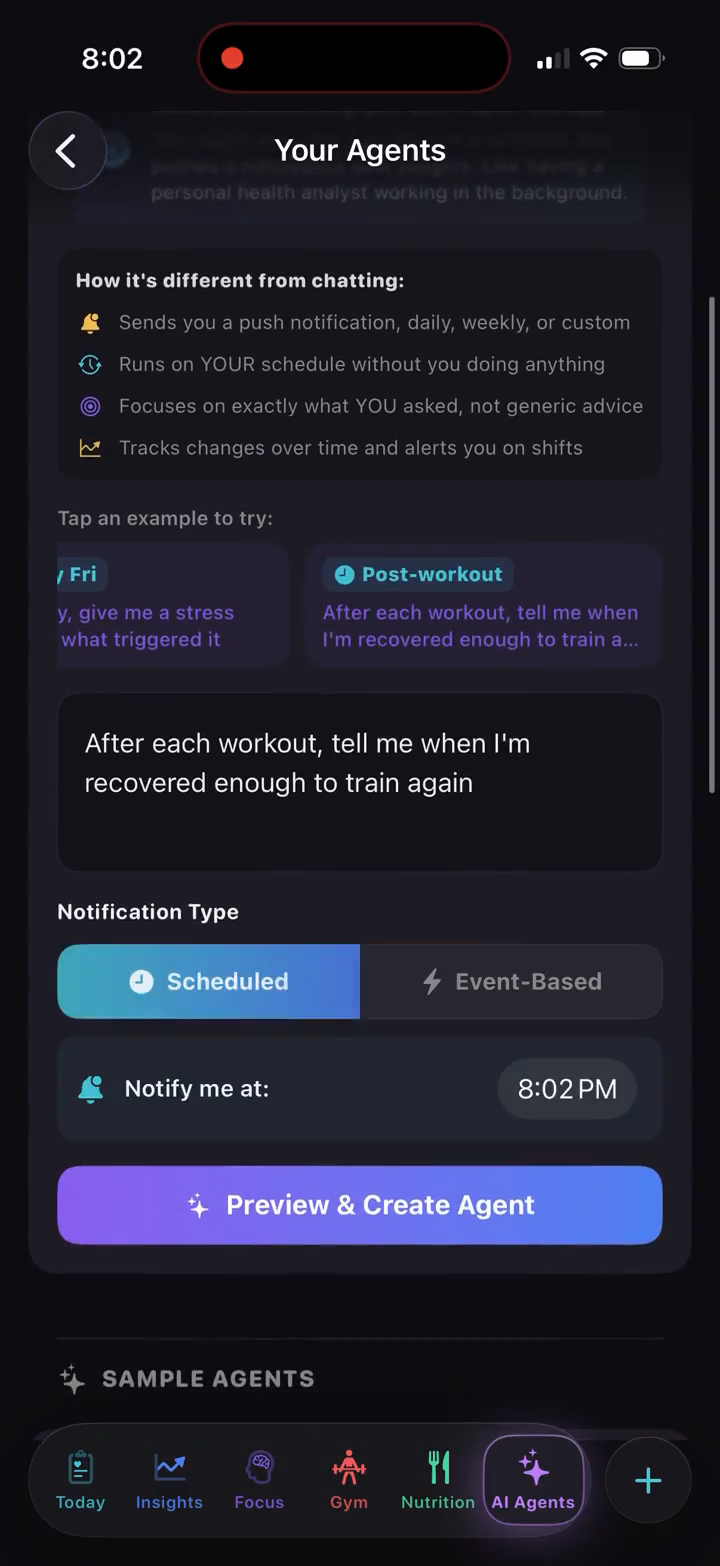
- Choose the timing. Choose “Scheduled” or “Event Based,” then tap “Preview & Create Agent” to review the proposed setup.
- Confirm and review the results. Tap “Confirm & Create Agent” after checking its purpose and timing. Allow notifications if you want alerts. Refine its purpose or schedule as your routine changes.
You do not need to write code or build a separate app to use this feature.
Watch a real app walkthrough
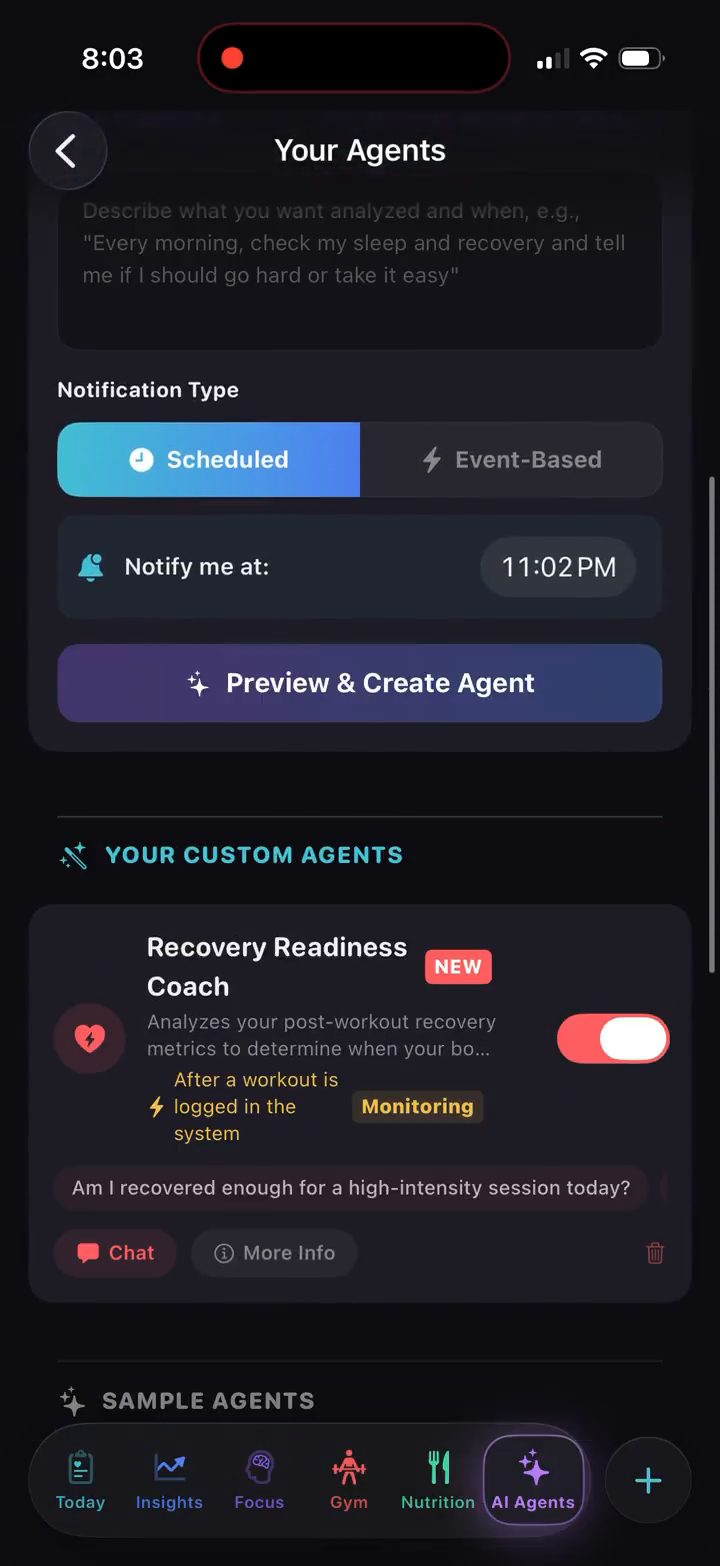
This 69-second WellVue recording shows a user creating a recovery agent and opening its chat. It is an existing product demonstration; interface details may differ from the current release. The responses shown illustrate app behavior, not a promised result for your health.
Readable walkthrough of the recording
- Open Your Agents. The AI Agents area offers built-in agents and a separate place for agents you create.
- Describe the job. The example asks for a review of recovery after a workout. The form shows a written prompt, notification type, and timing.
- Preview and create. A new “Recovery Readiness Coach” appears in the custom-agent list with its monitoring status.
- Open the agent’s chat. The recorded response discusses the available recovery trend, notes that current data has not synced, and includes a chart. This shows why checking data freshness matters.
- Review other agents. The recording also opens details of a sample stress-pattern agent and returns to the agent list.
To try this workflow, review pricing and feature access, connect your data, and use a question that fits your own routine.
Examples of wellness agents you can create
A morning sleep review
Try: “Each morning, summarize my latest sleep record and highlight changes from the past week.” This gives the agent a specific data source, comparison period, and schedule.
An HRV trend check
Try: “Watch my recent HRV against my baseline and explain repeated changes alongside my sleep history.” Missing or delayed measurements can affect the result; an alert is a prompt to review your context.
A weekly habit review
Try: “On Sunday, compare my recorded bedtime routine with sleep trends from this week.” Log the routine consistently so the agent has something meaningful to compare. Associations in your records do not establish cause and effect.
A recovery and activity review
Try: “Review my recent workouts and sleep before my weekly training-planning session.” Use the summary to organize your own decisions and questions.
Built-in coaches, AI chat, and custom agents
Built-in coaches start with a defined role, such as nutrition, daily planning, or habit analysis. AI chat lets you ask a question when you open a conversation. Custom agents let you specify an ongoing job and the timing for its checks.
WellVue's custom-agent setup happens inside WellVue. Creating a wellness agent does not require connecting an external ChatGPT or Claude account or configuring an MCP server. External-assistant integrations are a separate capability to evaluate when comparing apps.
What health data can the agents use?
WellVue supports Apple Health and Oura Ring. Depending on your device and permissions, available context can include sleep, HRV, activity, workouts, and information you log in the app, such as meals and habits. Apple Watch records can reach WellVue through Apple Health.
Read the integration guide for connection details and the sleep and recovery guide for related workflows. An agent cannot supply a measurement your connected sources did not record.
What should I know before enabling an agent?
Review the data access, purpose, and schedule before creating an agent. Notification delivery and background checks depend on settings, sync, service availability, and your account's feature access. The current app and App Store listing explain available purchase options.
AI insights may contain errors. WellVue is for general wellness and does not diagnose, treat, cure, or prevent disease. Read the privacy policy for cloud AI processing, data controls, and deletion options. The full product guide covers setup and other features.
Build an agent around your own question.
Explore WellVue's custom agent creation and current availability on the App Store.
View WellVue on the App Store